

A business owner once believed their systems were completely secure. Every update was installed, antivirus was active, and best practices were followed. Yet one day, unusual activity appeared files behaving strangely, systems slowing down, and unexplained processes running in the background. A full scan showed nothing. No malware detected. Everything appeared normal.
What actually happened was far from normal.
The system had encountered a zero-day attack a threat so new and unknown that even advanced security tools couldn’t recognize it yet.
What Is a Zero-Day Attack?
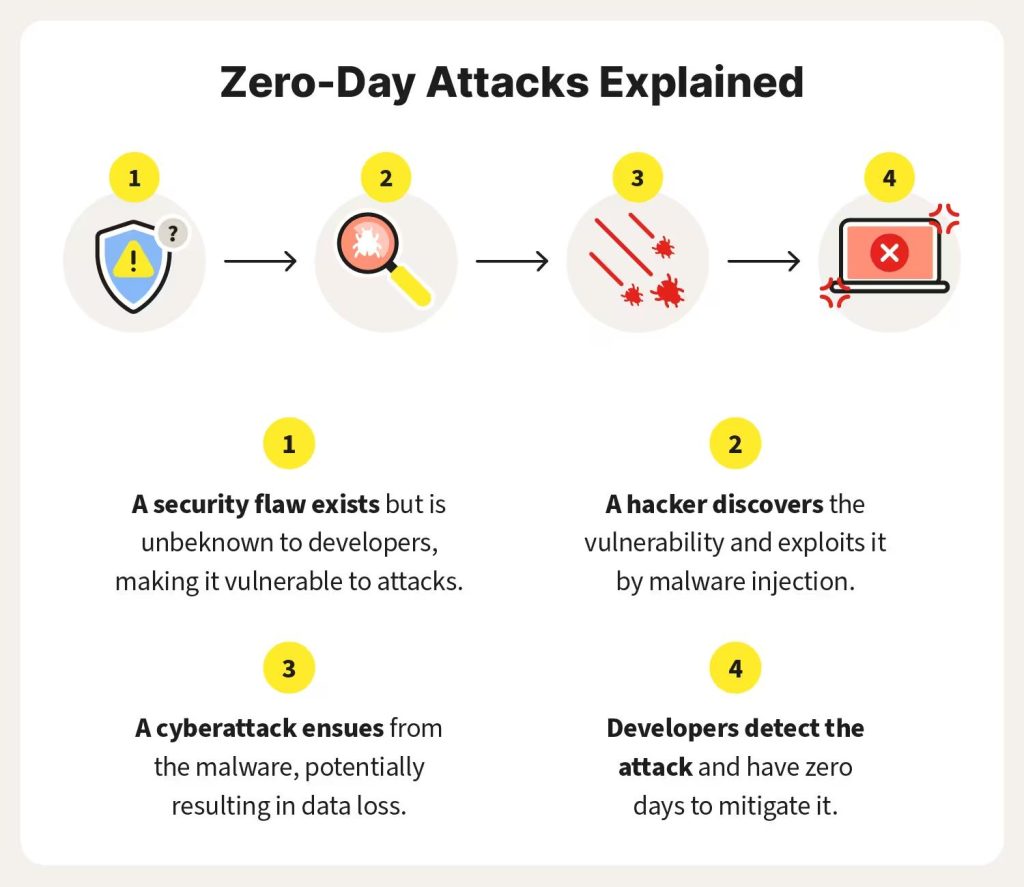
A zero-day attack is a cyberattack that exploits a software vulnerability before the software developer becomes aware of it or releases a fix.
The term “zero-day” refers to the fact that the vendor such as Microsoftbhas had zero days to identify and patch the flaw.
In simple terms, it means:
- A flaw exists in software
- Hackers discover it first
- They exploit it before anyone can stop them
Because the vulnerability is unknown, traditional security systems are often ineffective at detecting or blocking the attack.
Why Zero-Day Attacks Are So Dangerous
Zero-day attacks represent one of the most serious cybersecurity risks because they operate in a space where no defenses are fully prepared.
Several factors make them particularly dangerous:
- No available patch: There is no immediate fix from the vendor
- Undetectable threats: Antivirus tools may not recognize the attack
- Silent exploitation: Systems can be compromised without obvious signs
- Widespread impact: A single vulnerability can affect millions of users
Even fully updated systems, including those running Windows, can remain exposed until a fix is released.
Understanding the Zero-Day Vulnerability Timeline
A zero-day attack doesn’t happen instantly. It follows a lifecycle that explains why detection and prevention are so difficult.
1. Vulnerability Is Introduced
Every software application contains code, and with code comes the possibility of errors. A small programming mistake, misconfiguration, or overlooked condition can introduce a vulnerability. These flaws may remain hidden for months or even years without causing any noticeable issues.
2. Vulnerability Is Discovered
At some point, someone discovers the flaw. This could be a security researcher or a hacker. The outcome depends heavily on who finds it first.
- If ethical researchers discover it, they usually report it privately to the vendor
- If hackers discover it, they often keep it secret to exploit it
This stage marks the beginning of potential risk
3. Exploit Is Developed
Once a hacker identifies the vulnerability, they create an exploit, which is a method or code used to take advantage of the flaw.
This is a critical phase because:
- The exploit is unknown to the public
- Security tools cannot detect it
- The attacker has full advantage
4. Attack Begins (Zero-Day Phase)
The exploit is now used in real-world attacks. This is the true zero-day window, where:
- Systems are vulnerable
- No patch exists
- Antivirus tools are ineffective
This phase is often called the window of complete vulnerability, and it is the most dangerous period.
5. Discovery and Public Awareness
Eventually, the attack is detected often after damage has already occurred. Security researchers analyze the threat and identify the underlying vulnerability.
At this stage:
- Anti-malware vendors update detection signatures
- Organizations become aware of the threat
- Temporary defenses may be implemented
However, the root vulnerability still exists.
6. Patch Released
The software vendor, such as Microsoft, releases a security update to fix the vulnerability.
Once users apply the patch:
- The vulnerability is eliminated
- Exploits stop working
- Systems become secure again
However, systems that delay updates remain at risk.
Key Concepts Explained
Understanding a few core terms makes zero-day attacks easier to grasp:
- Vulnerability: A weakness or flaw in software
- Exploit: The method used to take advantage of that weakness
- Attack: The act of using the exploit to compromise a system
These three elements form the foundation of all cyberattacks.
Real-World Examples of Zero-Day Attacks
Zero-day vulnerabilities have been responsible for some of the most significant cyber incidents in history:
- Stuxnet
A sophisticated attack targeting industrial systems and nuclear infrastructure. - WannaCry ransomware attack
Spread rapidly across the globe, encrypting data and demanding ransom payments. - Heartbleed bug
Allowed attackers to access sensitive data, including passwords and encryption keys. - Pegasus spyware
Used for advanced surveillance, targeting journalists and officials.
These examples highlight how zero-day vulnerabilities can impact individuals, businesses, and even governments.
The Growing Risk of AI in Cyberattacks
Modern cyber threats are evolving rapidly with the help of artificial intelligence tools like GPT-4.
Attackers can now:
- Analyze vulnerability databases such as the CVE Program
- Generate exploit code automatically
- Launch attacks faster and at scale
This reduces the time between discovery and exploitation, making zero-day attacks even more dangerous.
How to Prevent Zero-Day Attacks
While it is impossible to prevent unknown vulnerabilities from existing, strong cybersecurity practices can significantly reduce the risk.
1. Keep Systems Updated
Regular updates ensure that known vulnerabilities are patched quickly. Delayed updates leave systems exposed even after fixes are available.
2. Implement Defense in Depth
Relying on a single security tool is not enough. A layered approach should include:
- Firewalls
- Antivirus software
- Endpoint detection systems
- Network monitoring tools
This ensures that if one layer fails, others can still provide protection.
3. Apply the Principle of Least Privilege
Users and applications should only have the minimum access required to perform their tasks. This limits the potential damage if a system is compromised.
4. Use Network Segmentation
Dividing networks into smaller sections prevents attackers from moving freely across systems. If one segment is compromised, others remain protected.
5. Deploy Advanced Security Tools
Modern threats require advanced detection methods, such as:
- Endpoint Detection and Response (EDR)
- Security Information and Event Management (SIEM)
- Intrusion Prevention Systems (IPS)
These tools focus on identifying unusual behavior rather than relying only on known signatures.
6. Maintain Regular Backups
Frequent backups ensure that data can be restored quickly in case of an attack. This is one of the most effective ways to recover from ransomware and similar threats.
What To Do If a Zero-Day Attack Happens
When facing a potential zero-day attack, immediate action is critical. 1. Disconnect the System
Shut down the device or disconnect it from the internet to prevent further damage or data exfiltration.
1. Disconnect the System
Shut down the device or disconnect it from the internet to prevent further damage or data exfiltration.
2. Restore from a Clean Backup
The safest recovery method is restoring your system from a backup created before the infection occurred.
3. Update and Scan
Update your antivirus or endpoint security tools and perform a full system scan. Detection capabilities improve as vendors learn about the threat.
4. Identify the Entry Point
Analyze how the attack occurred. Common entry points include:
- Phishing emails
- Malicious downloads
- Compromised websites
Understanding the cause helps prevent future incidents.
5. Apply All Security Updates
Install all available patches and continue monitoring for updates related to the vulnerability.
The Reality of Zero-Day Threats
Zero-day attacks highlight a constant race in cybersecurity:
- Hackers aim to discover and exploit vulnerabilities
- Developers work to identify and fix them
- Security tools evolve to detect new threats
Despite best efforts, there will always be moments when attackers have the advantage.
Protect WhatsApp from Zero-Day Attacks – Advanced Settings
Zero-day attacks on mobile apps like WhatsApp happen when hackers exploit unknown vulnerabilities in the app before the developers can fix them. While these attacks are rare, taking precautions can greatly reduce your risk.
Step 1: Update WhatsApp
- Always use the latest version from Google Play Store or Apple App Store.
- Updates include security patches that fix vulnerabilities.
Step 2: Go to Privacy Settings
- Open WhatsApp → Tap Settings
- Tap Privacy → Scroll down to Advanced
Step 3: Turn On Advanced Security Features
In the Advanced Privacy section, enable the following:
- Unknown Numbers Privacy
- Prevent unknown contacts from seeing your profile photo, status, and last seen.
- Block Unknown Account Messages
- Automatically block messages from numbers not in your contacts.
- Protect IP Address
- Enable options that prevent your IP from being exposed when receiving calls or messages.
- This reduces the risk of attackers tracking or exploiting your device.
Step 4: Additional Precautions
- Two-step verification: Go to Settings → Account → Two-step verification → Enable.
- Avoid clicking unknown links or downloading files from numbers not in your contacts.
- Report suspicious accounts immediately.
Final Thoughts
Zero-day attacks are a powerful reminder that cybersecurity is not just about tools it is about preparedness, awareness, and response.
While no system can be completely immune to unknown vulnerabilities, organizations and individuals who adopt strong security practices, stay updated, and act quickly during incidents can significantly reduce their risk.
In today’s rapidly evolving digital landscape, the question is no longer if vulnerabilities exist but how prepared you are when they are discovered.
Protect Your Business Before the Next Zero-Day Hits
Don’t wait until an unknown vulnerability compromises your systems.
- Real-time threat monitoring & incident response
- Endpoint detection & response (EDR)
- Network intrusion prevention & SIEM solutions
- Security patch management & vulnerability assessments
- Employee training on cyber hygiene & phishing prevention
Schedule a Free Security Assessment Today – Stay ahead of cyber threats and secure your business from the unknown.

