
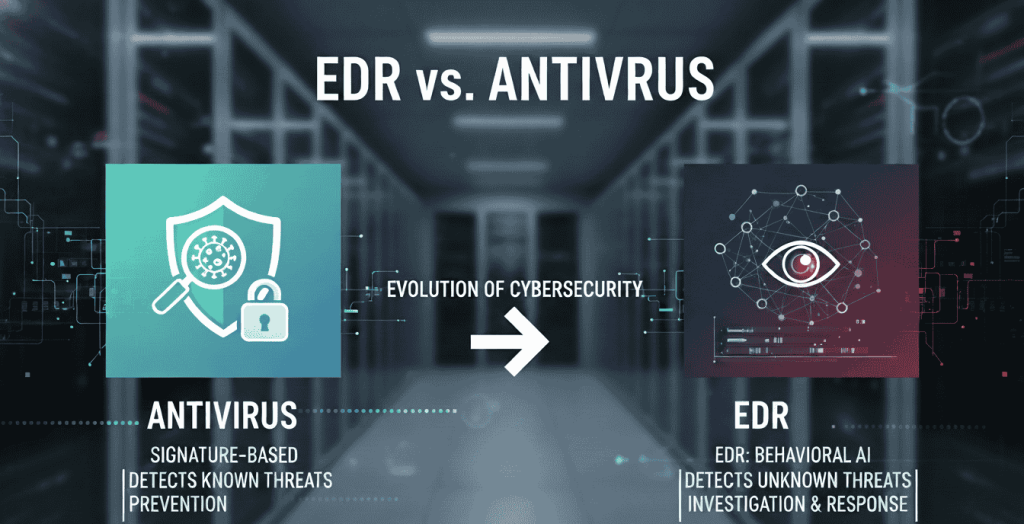
The choice between traditional antivirus (AV) and Endpoint Detection and Response (EDR) is one of the most important decisions for modern cybersecurity. While antivirus has long been the standard for protecting devices against known threats, it is no longer enough on its own. Cyberattacks have grown more advanced, requiring smarter, behavior-based solutions like EDR.
For many years, antivirus (AV) software was the go-to solution for businesses and individuals. It provided basic protection against known viruses and malicious files. However, as cyber threats have grown more complex, Endpoint Detection and Response (EDR) has emerged as a stronger, smarter, and more proactive defence system.
In this blog, we’ll break down the differences between traditional antivirus and EDR, explain why EDR is considered more crucial for modern organizational security, and answer the question: Do you really need both?
What Is Traditional Antivirus?
Traditional antivirus is software that scans your devices for known threats. It works by checking files against a database of signatures—unique codes that identify viruses and malware.
- How it works: If a file matches a known signature, antivirus blocks or deletes it.
- Strengths: Simple to use, effective against known threats, and provides a basic layer of protection.
- Limitations: It struggles with new or unknown threats because it can only detect what it already recognises.
Think of antivirus like a guard who only knows how to stop intruders he has seen before. If a new type of intruder shows up, the guard may not recognize the danger.
What Is Endpoint Detection and Response (EDR)?
EDR is the modern evolution of endpoint security. Instead of relying only on signatures, EDR uses behavior-based detection and advanced analytics to identify both known and unknown threats.
- How it works: EDR constantly monitors devices in real time, looking for suspicious behavior. If it finds something unusual, it investigates further using tools like a built-in sandbox (a safe, virtual environment where suspicious files can be tested).
- Strengths: Detects unknown threats, analyses behaviour, isolates suspicious files, and provides deep visibility into what’s happening on every device.
- Limitations: More advanced than antivirus, so it requires proper setup and monitoring (often through a Security Operations Center or SOC).
If antivirus is the guard at the gate, EDR is a full security team with cameras, alarms, and rapid response capabilities.
Key Differences Between Antivirus and EDR
Let’s look at the fundamental distinctions side by side:
- Real-Time Monitoring and Analysis
- Antivirus: Alerts you when it detects a known threat but does not provide detailed analysis.
- EDR: Monitors all activity in real time, gives detailed insights, and even visualises the attack with graphs and reports.
- Detection Method
- Antivirus: Uses signature-based detection (checks if a file matches a known malware signature).
- EDR: Uses behaviour-based detection (analyses what a file or process is actually doing, even if it’s new or unknown).
- Sandboxing
- Antivirus: Cannot test suspicious files safely.
- EDR: Runs suspicious files in a sandbox (a virtual machine) to observe behaviour without harming the actual system.
- Indicators of Compromise (IoCs) vs. Indicators of Attack (IoAs)
- Antivirus: Focuses only on IoCs—traces left behind after an attack.
- EDR: Detects both IoCs and IoAs—meaning it can spot an attack in progress before it fully executes.
- Response Capabilities
- Antivirus: Can block or delete known threats but has limited response options.
- EDR: Can isolate infected endpoints, block malicious traffic, and stop attacks in real time.
- Overall Security Posture
- Antivirus: Basic protection, suitable for individuals or very small businesses.
- EDR: Advanced, proactive protection that significantly strengthens an organisation’s overall security.
Why EDR Is More Crucial for Modern Organizations
Cybercriminals today don’t just rely on old viruses. They use advanced, sophisticated techniques that evolve constantly. Ransomware, zero-day attacks, phishing campaigns, and fileless malware are just some of the threats businesses face.
Here’s why EDR is essential for modern security:
- Detects Unknown Threats: EDR doesn’t wait for a signature update. It catches new, evolving threats by observing behaviour.
- Proactive Defence: By spotting Indicators of Attack (IoAs), EDR can stop an attack before it succeeds.
- Faster Response: With features like automatic isolation, EDR can contain an attack immediately, reducing damage.
- Deep Visibility: EDR provides security teams with insights into how an attack happened, which helps in preventing future incidents.
- Compliance: Many UAE businesses must meet strict data protection laws. EDR helps maintain compliance by providing continuous monitoring and reporting.
In short, antivirus is reactive, while EDR is proactive—and in cybersecurity, being proactive makes all the difference.
Do You Need Both Antivirus and EDR?
This is a common question. Some businesses wonder if they should run both antivirus and EDR together.
Here’s the reality:
- EDR already covers most of what antivirus does—plus much more.
- Running both can be redundant and may slow down your systems.
- Antivirus is considered an “old tool,” while EDR represents the future of endpoint protection.
Most security experts recommend focusing on EDR alone, especially for businesses that want strong, reliable protection without unnecessary performance issues.
How EDR Analyses Suspicious Files
To understand why EDR is so effective, let’s take a closer look at how it handles suspicious files:
- Suspicion Detected: If a file or process behaves strangely, EDR flags it.
- Sandboxing: The file is placed into a virtual machine (sandbox) where it can run safely without harming the system.
- Behavior Analysis: EDR observes what the file does. Does it try to connect to a strange server? Does it modify sensitive files? These patterns help determine if it’s malicious.
- Decision and Response: If confirmed malicious, EDR blocks or isolates it immediately.
This approach means even unknown threats can be detected and neutralized before they cause harm.
Conclusion
While traditional antivirus still has a role in providing basic protection, it is no longer enough for businesses facing today’s sophisticated cyber threats. Endpoint Detection and Response (EDR) offers a smarter, stronger, and more proactive approach—giving organizations real-time monitoring, behavior-based detection, sandboxing, attack indicators, and powerful response capabilities.
For SMEs, SMBs, and enterprises in Dubai and the UAE, choosing EDR over antivirus can be the difference between a minor security incident and a major data breach.
If your organization is still relying only on antivirus, now is the time to upgrade your defenses with EDR and a dedicated Security Operations Center (SOC). Cybersecurity is no longer optional—it’s essential for protecting your data, your clients, and your reputation.
What is the primary difference between EDR and Antivirus software?
The main difference lies in how they detect threats. Antivirus relies on signature-based detection, identifying malware by matching files against a database of known signatures. EDR (Endpoint Detection and Response) uses behavior-based detection, analyzing how files and processes act—even if they have no known signature. EDR can also run suspicious files in a sandbox (a virtual machine) for safe analysis.
How does EDR achieve advanced threat detection?
EDR continuously monitors devices in real-time. When it encounters a suspicious file, it places it into a sandboxed environment where it observes its behavior. If the file shows malicious patterns—such as modifying sensitive files or connecting to unknown servers—EDR blocks it. This proactive method allows EDR to stop threats that antivirus might miss.
Can EDR isolate and block malicious activity?
Yes. One of EDR’s key strengths is its ability to isolate compromised endpoints and block malicious activity immediately. This limits the spread of malware across your network and reduces potential damage.
What is an “IOC” in cybersecurity?
IOC stands for Indicator of Compromise. These are traces left behind by a cyberattack, such as suspicious IP addresses, unusual file changes, or malicious domains. Antivirus typically detects IOCs after an attack has occurred. EDR, however, goes beyond IOCs by also monitoring Indicators of Attack (IoAs), which help identify attacks in progress.
Why is EDR more beneficial for Organizations than Antivirus?
EDR provides a proactive, advanced security approach. Unlike antivirus, which only protects against known threats, EDR offers:
Real-time monitoring
Behavior-based detection
Sandboxing capabilities
Indicators of Attack (IoAs)
Automated isolation and blocking
This makes EDR more effective at handling modern, sophisticated cyberattacks while reducing the burden on IT and security teams.
Is it necessary to have both EDR and Antivirus installed?
In most cases, no. EDR already includes the capabilities of antivirus plus much more. Running both tools can be redundant and may cause performance issues, such as slower systems and lagging. For most organizations, EDR alone provides sufficient and comprehensive protection.
What are the downsides of installing both EDR and Antivirus?
The biggest drawback is reduced system performance. Running two security tools at once consumes extra memory and processing power, which can slow down endpoints and affect productivity.
Why was EDR developed if Antivirus already existed?
As cybercriminals became more sophisticated, traditional antivirus struggled to keep up. Many attacks now use zero-day exploits, fileless malware, and advanced evasion techniques that signatures cannot detect. EDR was developed to close this gap, offering real-time behavioral analysis, monitoring, and automated response to combat modern threats.

